A Discord bot SDK that works like a web server.
I wanted writing a Discord bot to feel like writing a small web app. Register a handler, get a request, send a reply. Bang!...bot done. This became particularly interesting once bots could be served over HTTP.
Unicord 🦄 is a TypeScript SDK for that. One client, one command API. A chat command and a slash command can share the same function.
You dont have to choose between the gateway, webhooks, application commands, or fiddle with file based command registration; just write the damn code!
A whole bot can look like this:
import { Client, type Context } from 'unicord';

// Initialize and configure
const client = new Client({
    token: '<token>',
    application_id: '<application_id>',
    intents: [Intent.ALL],
    prefix: '??'
});

// Register arbitrary event handler to know when we are logged in
client.on('READY', async (_, payload) => {
    console.log(`Logged in as ${payload.user.username}${payload.user.discriminator?.length > 0 ? `#${payload.user.discriminator}` : ''}`);
});

// Register a command
client.chatCommands.register('ping', (context: Context, args) => {
    context.reply('Pong!', true);
});

// Connect!
client.connect();
Boom done. We are Pong-ing all the Pings!
My favorite part to build and use is the ✨~Hydrator~✨. (Sounds fancy right? 💪😎) When handling some interaction the client assumes you want the least data neccessary. Then say you want to know the guild, for instance, you can request it be "Hydrated".
client.chatCommands.register('guild', async (context: Context, _args: any[]) => {
    const hydrate = await context.hydrator([Expectation.Guild]);
    const hasGuild = hydrate(context);

    const { message } = context;

    if (hasGuild) {
        await context.reply(`You are in ${message.guild.name}`, true);
    } else {
        await context.reply(`We are not in a server`, true);
    }
});
If the requested data has been seen recently it is simply filled in from the local cache, otherwise it is fetched from the API.
You'll notice that you also recieve a boolean from the hydrator. This boolean indicates to the type system if hydration was sucessful. (a.k.a it returns a type assertion!)
For the uninitiated: this means for if statment that follows inside the true case message.guild will be typed as Guild and in the false case as undefined!
Huzzah! Type safety! 🍻
But wait there's more!?
What about user input? Can't trust it? Has to be validated? A tale as old as time...however old time is.
Fear no more Unicord can also validate, resolve, and type your command arguments!
Check it out:
// First we define a commmand with the helper
const avatarCommand = createCommandHandler({
    description: 'Get a users avatar',
    // In the definition we provide our arguments in order:
    args: [
        {
            id: 'user',
            name: 'user',
            // And here we inform the client what type we expect
            type: CommandOptionType.User,
            description: 'The user to get the avatar for',
            required: true
        }
    ],
    execute: async (context: Context, args) => {
        // Now inside of our execution function `args`
        // will have the type: `{ user: User }`
        context.reply(args.user.avatarURL);
    }
});
And just like that when our function is called the first argument is translated into a Discord User object! Nifty!
Many different option types exist. You can even have an Enum. When constraints are known the Unicord client can auto reply to bad command usage with an error message and the valid values allowed!
To finish out the example — you would then register your command handler:
// Either as a plain ol' chat command
client.chatCommands.register('avatar', avatarCommand);
// Or a fancy slash command
client.applicationCommands.register('avatar', ApplicationCommandType.Chat, avatarCommand);
And use it in Discord like so:
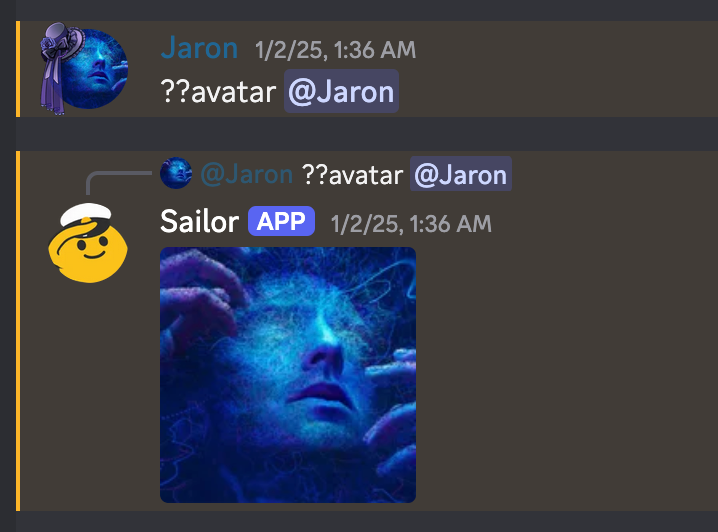
It's pretty unfinished and out of date so not everything works, but I think this first spike really shows some potential in the idea! And it's fun to write imo.